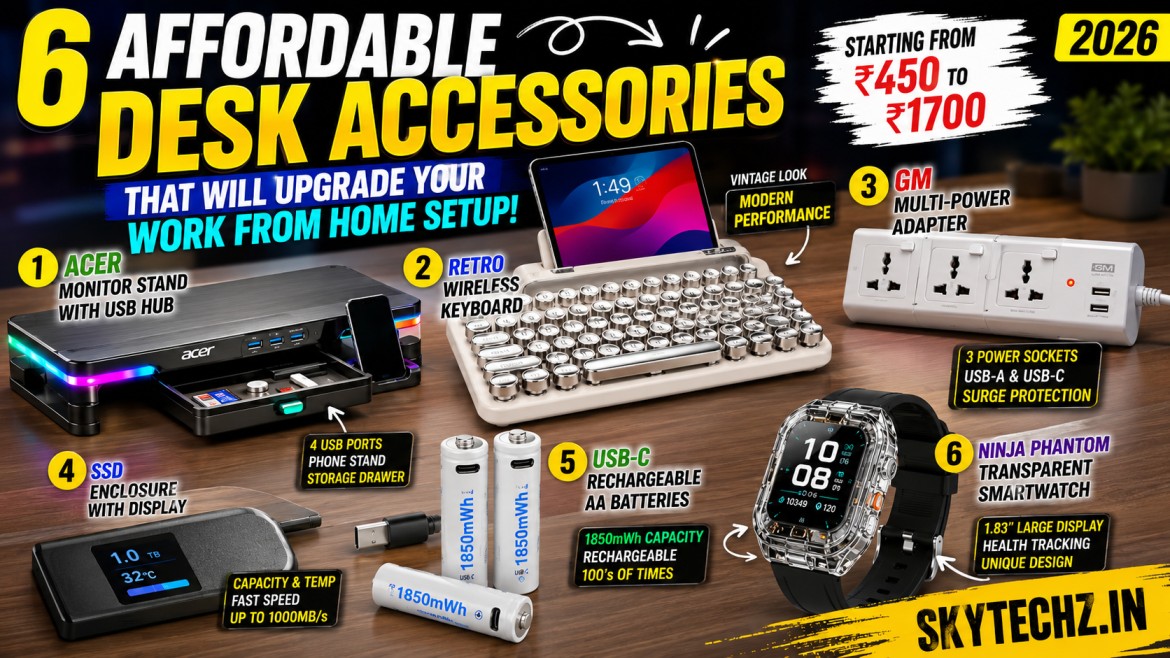
A comfortable and organized workspace can make a big difference in your daily productivity. Whether you’re a student attending online classes, a professional working remotely, or a creator editing videos, the right desk accessories help you work faster and stay organized.
The products discussed in the transcript focus on practical everyday accessories rather than expensive gadgets. Most are priced between ₹450 and ₹1,700, making them suitable for people who want useful upgrades without spending a lot.
In this guide, we’ll explore six desk accessories that stand out for their functionality, build quality, and value for money.
Why Desk Accessories Matter
Many people invest in laptops and monitors but overlook the small accessories that improve comfort and efficiency.
A few well-chosen accessories can help you:
- Organize cables
- Save desk space
- Improve posture
- Increase productivity
- Reduce clutter
- Make your workspace more enjoyable
Instead of buying expensive equipment, upgrading a few everyday items often provides a noticeable improvement.
1. Acer RGB Monitor Stand with USB Hub
One of the most interesting products featured in the transcript is the Acer Monitor Stand.
At first glance, it looks like a simple monitor riser, but it offers several additional features that make it much more practical.
The stand includes built-in RGB lighting, multiple USB ports, storage compartments, and adjustable width, making it useful for both home and office setups.
Key Features
- Adjustable width
- RGB LED lighting
- Four USB Type-A ports
- Phone holder
- Small storage drawer
- SD card storage space
- USB Type-C connectivity
Design and Build Quality
The stand has a clean modern design that fits most desks.
According to the transcript, Acer claims it can support up to 15 kg, although the presenter suggests using it with around 7–8 kg for comfortable daily use.
Its adjustable design allows users to increase or decrease its width depending on desk space and monitor size.
Productivity Benefits
Besides raising your monitor to a more comfortable viewing height, it also adds extra USB ports directly on your desk.
Instead of reaching behind your computer every time you connect a flash drive or accessory, everything remains easily accessible.
The storage drawer is also useful for keeping small items such as:
- SD cards
- USB drives
- SIM ejector tools
- Memory cards
- Adapters
Pros
✔ Excellent build quality
✔ Multiple USB ports
✔ Attractive RGB lighting
✔ Adjustable size
✔ Extra storage space
Cons
- RGB lighting may not appeal to everyone.
- Slightly more expensive than a basic monitor stand.
Price
Approximate price:
₹1,700–₹1,800
Rating
8/10
Considering its extra features, this monitor stand offers good value for users looking to organize their workspace.
2. Retro Typewriter Wireless Keyboard
If you enjoy vintage designs, this keyboard immediately catches your attention.
Inspired by old mechanical typewriters, it combines a classic appearance with modern wireless connectivity.
The round keys, chrome accents, and white finish create a unique desktop aesthetic.
Features
- Wireless connectivity
- Bluetooth support
- 2.4 GHz wireless receiver
- Multi-device pairing
- Tablet and phone holder
- Typewriter-style keycaps
- AAA battery powered
Build Quality
The keyboard feels sturdy and premium despite its affordable price.
The tactile keys provide satisfying feedback while typing, making long writing sessions more enjoyable.
Although it resembles a traditional typewriter, it remains lightweight and portable.
Multi-Device Support
One useful feature mentioned in the transcript is the ability to connect multiple devices.
Users can quickly switch between:
- Laptop
- Tablet
- Smartphone
This makes it especially useful for people working across different devices throughout the day.
Who Should Buy It?
This keyboard is suitable for:
- Bloggers
- Students
- Writers
- Office workers
- Remote employees
Anyone looking to add a stylish element to their desk while maintaining wireless convenience may find it appealing.
Pros
✔ Beautiful retro design
✔ Comfortable typing experience
✔ Wireless connectivity
✔ Multi-device support
✔ Compact design
Cons
- Uses AAA batteries instead of a rechargeable battery.
Price
Approximately
₹1,500–₹1,600
Rating
9/10
The combination of vintage styling and modern functionality makes this one of the most interesting accessories featured in the transcript.
Why Budget Desk Accessories Are Worth Buying
Not every productivity upgrade requires spending thousands of rupees.
Accessories such as monitor stands, ergonomic keyboards, and USB hubs often provide everyday convenience while keeping your workspace clean and organized.
When chosen carefully, affordable accessories can improve comfort, reduce desk clutter, and help you work more efficiently without exceeding your budget.
3. GM Multi-Power Adapter – A Small Upgrade That Makes a Big Difference
Every modern desk has multiple devices that need power, such as laptops, monitors, phone chargers, speakers, and smart gadgets. A reliable power adapter can help keep everything organized and reduce cable clutter.
One of the standout products from the transcript is the GM Multi-Power Adapter, designed for both home and office use.
Unlike ordinary extension boards, this adapter offers multiple power sockets and USB charging options in a compact design.
Key Features
- Three universal power sockets
- USB Type-A charging port
- USB Type-C charging port
- Built-in surge protection
- LED power indicator
- Heavy-duty cable
- Compact design
Build Quality
GM is already known for producing durable electrical accessories, and this adapter follows the same standard.
The thick cable feels sturdy, and the sockets provide a firm grip, ensuring plugs remain securely connected.
The LED indicator also makes it easy to check whether power is being supplied.
Why It Is Worth Buying
Instead of carrying multiple chargers, users can connect laptops, smartphones, tablets, and accessories from a single power strip.
It also helps reduce desk clutter and provides better cable management.
Best For
- Home offices
- Students
- Gaming setups
- Content creators
- Professionals
Pros
✔ Excellent build quality
✔ USB-A & USB-C charging
✔ Compact size
✔ Reliable surge protection
✔ Trusted brand
Cons
- Limited number of AC sockets for users with many devices.
Approximate Price
₹800–₹850
Rating
⭐ 9.5/10
Considering its quality and features, this is one of the best value-for-money desk accessories under ₹1,000.
4. SSD Enclosure with Display
Portable SSDs have become increasingly popular for photographers, video editors, programmers, and professionals who work with large files.
The transcript also featured a unique SSD enclosure that includes a built-in display showing storage capacity and temperature information.
Key Features
- USB Type-C connection
- SSD temperature display
- Capacity indicator
- Fast read and write speeds
- Compact aluminium body
Performance
According to the transcript, the enclosure delivers read and write speeds close to 900–1000 MB/s, making it suitable for transferring large files quickly.
The built-in display adds a premium appearance by showing information such as SSD capacity and operating temperature.
Is the Display Necessary?
Although the display looks attractive, the presenter points out that most users can monitor SSD health through software instead.
A standard enclosure without a display usually costs much less while offering similar performance.
Pros
✔ Premium appearance
✔ Fast transfer speeds
✔ Compact design
✔ Good build quality
Cons
- Display adds extra cost.
- Software can provide similar information.
- Better value is available with simpler enclosures.
Approximate Price
₹1,400–₹1,500
Rating
⭐ 5.5/10
The enclosure performs well, but the display alone may not justify the higher price for most users.
5. USB-C Rechargeable AA Batteries
Disposable batteries are convenient but create unnecessary electronic waste over time.
One of the most practical products mentioned in the transcript is a set of USB-C rechargeable AA batteries.
Instead of throwing batteries away after a single use, these can be recharged hundreds of times using a regular USB-C cable.
Key Features
- USB Type-C charging
- Rechargeable design
- High-capacity battery
- Long lifespan
- Environment-friendly
Why They’re Useful
Many household devices still rely on AA batteries, including:
- Wireless keyboards
- Computer mice
- TV remotes
- Cameras
- Toys
- Wall clocks
- Flashlights
Using rechargeable batteries reduces long-term costs while also helping minimize electronic waste.
Charging Process
Charging is simple.
Just connect a USB-C cable to each battery and plug it into a standard phone charger.
There’s no need for a separate battery charger, making the process quick and convenient.
Advantages
✔ Saves money over time
✔ Eco-friendly
✔ Easy USB-C charging
✔ High capacity
✔ Long battery life
Who Should Buy It?
- Students
- Office workers
- Gamers
- Photographers
- Families
Anyone who regularly uses AA batteries can benefit from switching to rechargeable versions.
Rating
⭐ 9.5/10
This is one of the smartest purchases for anyone looking to reduce waste while saving money.
Comparison Table
| Product | Approx. Price | Best For | Rating |
|---|---|---|---|
| Acer RGB Monitor Stand | ₹1,700–₹1,800 | Desk organization | ⭐⭐⭐⭐☆ (8/10) |
| Retro Wireless Keyboard | ₹1,500–₹1,600 | Typing & aesthetics | ⭐⭐⭐⭐⭐ (9/10) |
| GM Multi-Power Adapter | ₹800–₹850 | Power management | ⭐⭐⭐⭐⭐ (9.5/10) |
| SSD Enclosure with Display | ₹1,400–₹1,500 | File transfers | ⭐⭐⭐☆☆ (5.5/10) |
| USB-C Rechargeable AA Batteries | Varies | Everyday electronics | ⭐⭐⭐⭐⭐ (9.5/10) |
Tips Before Buying Desk Accessories
Before purchasing any desk accessory, consider these factors:
- Compatibility: Make sure it works with your existing devices.
- Build Quality: Durable materials usually last longer.
- Power Requirements: Check if the accessory needs batteries, USB power, or an adapter.
- Desk Space: Measure your available workspace before buying larger accessories.
- Value for Money: Focus on features you’ll actually use instead of paying extra for cosmetic additions.
6. Ninja Phantom Transparent Smartwatch
The final product featured in the transcript is the Ninja Phantom Transparent Smartwatch. While the smartwatch market has become highly competitive, this model stands out because of its transparent design, giving it a distinctive look compared to conventional smartwatches.
According to the transcript, the transparent back allows users to see some of the internal components, creating a futuristic appearance. It includes a 1.83-inch LCD display and offers the standard features expected from an entry-level smartwatch. However, the presenter also points out that some adhesive is visible inside the transparent body, making the finish feel less premium than expected.
Key Features
- 1.83-inch LCD display
- Transparent body design
- Bluetooth connectivity
- Fitness tracking
- Heart rate monitoring
- Sleep tracking
- Notification support
- Multiple watch faces
Design
If you’re someone who likes gadgets that look different, this smartwatch certainly attracts attention. The transparent casing gives it a modern, tech-inspired appearance that can become a conversation starter.
However, if you’re looking for premium build quality, you may notice small imperfections that were mentioned in the transcript.
Performance
For its price, the smartwatch delivers all the basic functions most users expect:
- Step counter
- Sleep monitoring
- Heart rate tracking
- Call notifications
- Message alerts
- Sports modes
- Alarm and timer
It is best suited for users who want an affordable smartwatch with a unique design rather than advanced health tracking.
Pros
✔ Unique transparent design
✔ Large display
✔ Lightweight
✔ Affordable
✔ Good battery backup for everyday use
Cons
- Build quality could be better
- Transparent finish may reveal glue or internal assembly
- Lacks premium smartwatch features
Approximate Price
₹1,200
Rating
⭐ 7.5/10
The design is its biggest attraction, but buyers looking for advanced features may prefer spending more on a higher-end smartwatch.
Which Product Offers the Best Value?
After reviewing all six accessories, here’s a quick summary:
| Product | Best For | Value Rating |
|---|---|---|
| Acer RGB Monitor Stand | Desk organization | ⭐⭐⭐⭐☆ |
| Retro Wireless Keyboard | Typing & aesthetics | ⭐⭐⭐⭐⭐ |
| GM Multi-Power Adapter | Power management | ⭐⭐⭐⭐⭐ |
| SSD Enclosure with Display | External storage | ⭐⭐⭐☆☆ |
| USB-C Rechargeable Batteries | Everyday electronics | ⭐⭐⭐⭐⭐ |
| Ninja Phantom Smartwatch | Budget smartwatch | ⭐⭐⭐⭐☆ |
Buying Guide: Which One Should You Choose?
For Students
- Retro Wireless Keyboard
- GM Multi-Power Adapter
- USB-C Rechargeable Batteries
These products improve productivity without requiring a large investment.
For Professionals
- Acer RGB Monitor Stand
- GM Multi-Power Adapter
- Retro Keyboard
These accessories create a cleaner and more comfortable workspace for daily office tasks.
For Content Creators
- SSD Enclosure
- Monitor Stand
- Rechargeable Batteries
These are practical additions for photographers, video editors, and creators who regularly transfer files and use multiple devices.
For Casual Users
If you’re looking for simple everyday upgrades, the rechargeable batteries, power adapter, and monitor stand provide the best long-term value.
Frequently Asked Questions (FAQ)
Are these desk accessories worth buying?
If you spend several hours each day working, studying, or creating content, these accessories can improve organization, comfort, and convenience without costing a lot.
Which product provides the best value for money?
The GM Multi-Power Adapter and USB-C Rechargeable Batteries stand out because they combine affordability with everyday usefulness.
Is the SSD enclosure with a display worth the extra cost?
The transcript suggests that while the display looks attractive, most users can get similar functionality from a standard SSD enclosure at a lower price.
Is the retro keyboard only for decoration?
No. Although its vintage appearance is a major attraction, it also offers practical features such as wireless connectivity and multi-device support.
Who should buy the transparent smartwatch?
It’s best for users who want a stylish, affordable smartwatch with standard features. Those looking for advanced health tracking or premium materials may want to compare other options.
Final Verdict
Not every useful tech product has to be expensive. Sometimes, small accessories can make a noticeable difference to your daily workflow.
Among the products featured, the GM Multi-Power Adapter, Retro Wireless Keyboard, and USB-C Rechargeable Batteries offer the strongest combination of affordability, practicality, and long-term value.
The Acer RGB Monitor Stand is also a worthwhile investment for anyone wanting a cleaner desk with extra connectivity, while the SSD Enclosure with Display is more of a niche choice for users who appreciate its visual display. The Ninja Phantom Transparent Smartwatch stands out mainly because of its unique appearance.
Whether you’re upgrading a home office, building a study desk, or refreshing your workspace, choosing practical accessories can improve comfort, reduce clutter, and make everyday tasks more enjoyable.
Conclusion
A productive workspace doesn’t always require expensive equipment. Smart, well-chosen accessories can enhance your setup, improve efficiency, and make daily work more comfortable.
If you’re planning to upgrade your desk in 2026, start with accessories that solve real problems—such as better organization, reliable power management, comfortable typing, and reusable batteries. Over time, these small improvements can have a significant impact on your overall productivity.